
.xlsx, .xls). Maximum 10 MB per file.CSV and Excel (.xlsx, .xls). Maximum 10 MB per file.
To begin, open the Structured Data tab and click Upload data fileTo begin, open the Structured Data tab and click Upload data file.
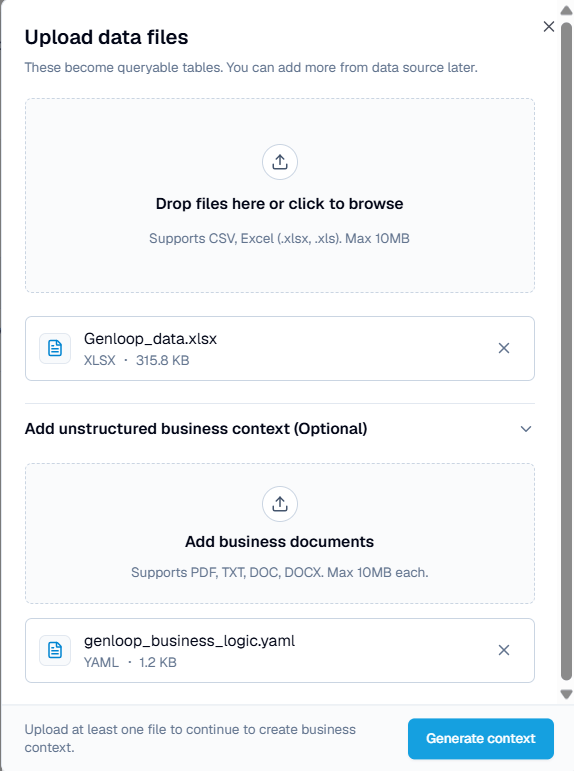
Data files and business-context documents are different. Data files become queryable tables. Business-context documents describe how to read that data and do not create tables. You can add both in the same dialog.
Upload a file
1
Add your data files
Drag files onto the drop zone, or click to browse. Each file becomes a queryable table. You can add more files to the same source later.
2
Add business context (optional)
Expand Add unstructured business context and upload documents that explain how your data should be read, such as metric definitions, KPI logic, or business rules. Supported formats:
.pdf, .txt, .doc, .docx. Maximum 10 MB each.3
Generate context
Click Generate context. Genloop maps the files to tables, applies any business context, and builds memory on the result.
Data files and business-context documents are different. Data files become queryable tables. Business-context documents describe how to read that data and do not create tables. You can add both in the same dialog.
Upload a file
1
Add your data files
Drag files onto the drop zone, or click to browse. Each file becomes a queryable table. You can add more files to the same source later.
2
Add business context (optional)
Expand Add unstructured business context and upload documents that explain how your data should be read, such as metric definitions, KPI logic, or business rules. Supported formats:
.pdf, .txt, .doc, .docx. Maximum 10 MB each.3
Generate context
Click Generate context. Genloop maps the files to tables, applies any business context, and builds memory on the result.
After the upload
The file appears in your Structured Data list with a processing status. Once processing completes, you can query it in Chat like any connected database.Next steps
Unstructured Data
Manage business documents that inform Genloop’s answers.
Connect a database
Connect a live database for larger or changing datasets.